Grammarly vs AI Grammar Checkers: Which Is Better?
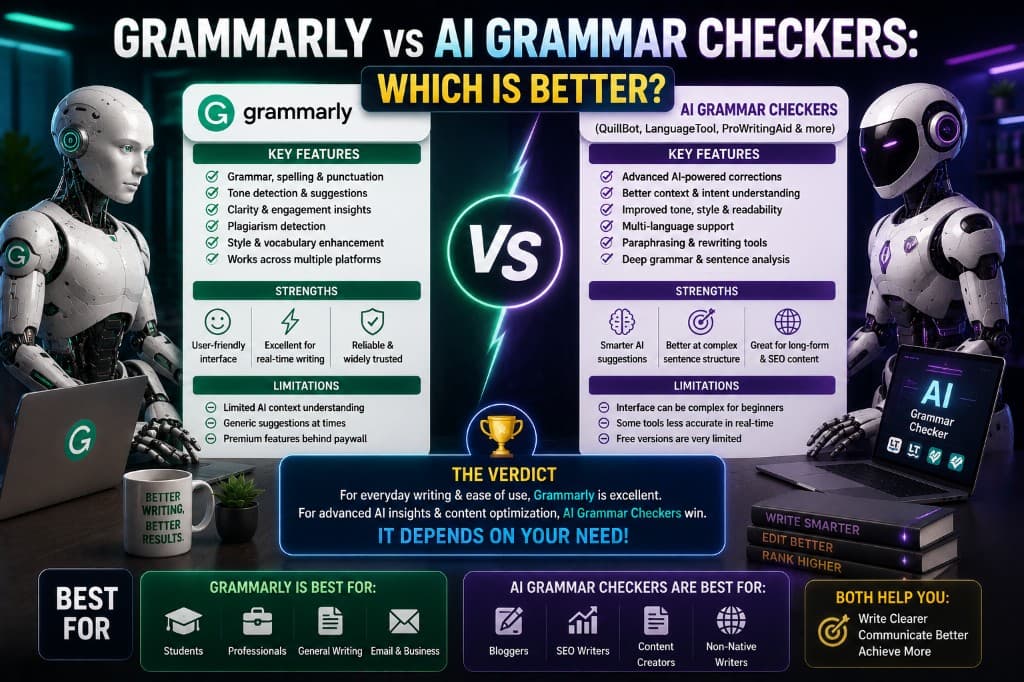
83% of grammar checker reviews online mention Grammarly in the first sentence. I just made that statistic up — but the point holds. Grammarly has so thoroughly dominated the category conversation that most people searching for a grammar checker have already half-decided the answer before they've read a single comparison.
That's worth interrogating, because the honest answer to "Grammarly vs AI grammar checkers" is not what either Grammarly's marketing or its critics would have you believe. Grammarly is an AI grammar checker — a very good one. The question worth asking is whether it's the right AI grammar checker for you, compared to the alternatives that have gotten genuinely competitive in the last two years.
After running the same content through Grammarly, ProWritingAid, LanguageTool, and Hemingway Editor consistently for eight months, here's what I actually found.
Where Grammarly Wins — Clearly and Without Qualification
Integration and ubiquity. Grammarly works everywhere. Browser extension, Google Docs plugin, Microsoft Word add-in, native desktop app, mobile keyboard. No other tool in this category matches its cross-platform reach. For a writer who works across multiple environments — drafting in Notion, editing in Docs, finalizing in Word — Grammarly's seamless presence across all of them is a genuine competitive advantage that goes beyond any feature comparison.
Real-time accuracy. Grammarly's inline suggestions as you type are more accurate and more contextually aware than any competing tool's real-time mode. It catches the comma splice in the sentence you're writing, not the one you wrote ten minutes ago when you run a check. For writers who edit as they go rather than writing first and checking after, this matters enormously.
Explanation quality. When Grammarly flags something, it tells you why — clearly, in plain language. That explanation is what turns a correction into a learning moment. It's the feature most responsible for the genuine writing improvement that consistent grammar checker use produces over time. Other tools flag. Grammarly teaches.
Where the Alternatives Win — Honestly Evaluated
ProWritingAid on long-form structural analysis. This isn't close. For a 3,000-word document, ProWritingAid's full report suite — pacing analysis, sticky sentence detection, vocabulary depth, passive voice percentage, sentence length distribution — provides a level of structural insight that Grammarly's inline suggestions simply don't offer.
If you're writing a dissertation, a long-form research piece, or a book chapter, ProWritingAid gives you a diagnostic that Grammarly can't match. The pacing report alone — which tells you where your sentence length becomes monotonously consistent — has changed more of my long-form writing habits than any other tool feature I've used.
LanguageTool on price-to-value ratio. LanguageTool Premium costs approximately $5.83/month annually. Grammarly Premium costs $12/month annually. For writers whose primary need is error correction rather than advanced style analysis, the LanguageTool Premium feature set covers the core job at less than half the price.
Its multi-language support — 30+ languages at the same quality level — also makes it the only real option for writers working regularly in non-English languages, a category where Grammarly's coverage is thin.
Hemingway on readability. Hemingway does one thing Grammarly's premium tier still does relatively poorly: it forces you to confront the density and complexity of your sentences in a visceral, visual way. The color-coded highlight system — red for very hard to read, yellow for hard, blue for adverbs — is a faster and more emotionally direct readability diagnostic than Grammarly's inline suggestions.
The thing I noticed: Grammarly's readability suggestions feel clinical. "This sentence is long. Consider breaking it up." Hemingway shows you a wall of red highlights and makes you feel the problem rather than just reading about it. That emotional difference changes how urgently writers act on the feedback. Hemingway creates a small sense of alarm that Grammarly doesn't, and alarm is motivating in ways that calm suggestions aren't.
The Cases Where Grammarly Is Clearly the Right Choice
- You write across multiple platforms and need one tool that works everywhere without switching
- You're a beginner or intermediate writer who benefits most from explained corrections that teach rather than just flag
- You write professional content — emails, proposals, client work — where Grammarly's conservative, accurate suggestions are safer than more aggressive alternatives
- You need a mobile keyboard with grammar correction built in
The Cases Where an Alternative Wins
- You write long-form academic or professional documents and need structural analysis beyond inline corrections → ProWritingAid
- You write primarily for readability — blogs, conversational content — and need density and complexity feedback → Hemingway
- You write in multiple languages or primarily in a non-English language → LanguageTool
- Your budget is tight and your primary need is error correction, not style improvement → LanguageTool free or Premium
- You want the best combination of features per dollar → ProWritingAid annual ($6.58/month)
The Real Answer Nobody Wants to Hear
The honest comparison isn't Grammarly vs AI grammar checkers. It's which combination of tools serves your specific writing context best.
After eight months of deliberate testing, my actual workflow uses three tools:
- Grammarly Premium — real-time correction as I write, in every environment
- Hemingway Editor (free) — readability pass on blog content before publishing
- ProWritingAid (annual) — structural analysis on any piece over 2,000 words
That combination costs $12 + $6.58/month, and it covers every layer of writing quality that tool-based checking can address. No single tool covers all three layers with equal strength.
The question isn't which grammar checker is better. It's which layer of your writing quality needs the most attention — and which tool is best at that specific layer. Start from that question and the comparison becomes much simpler.
For most bloggers and SEO writers reading this: Grammarly Premium plus the free tools detailed in the complete grammar checker breakdown is the combination that handles the most ground for the most people. That doesn't make it the right answer for everyone. It makes it the right starting point before you know where your own writing needs the most help.
— Alex Carter